 Celebrate with up to 80% off
VDI vs. VPN: Which remote access solution is right for your business?


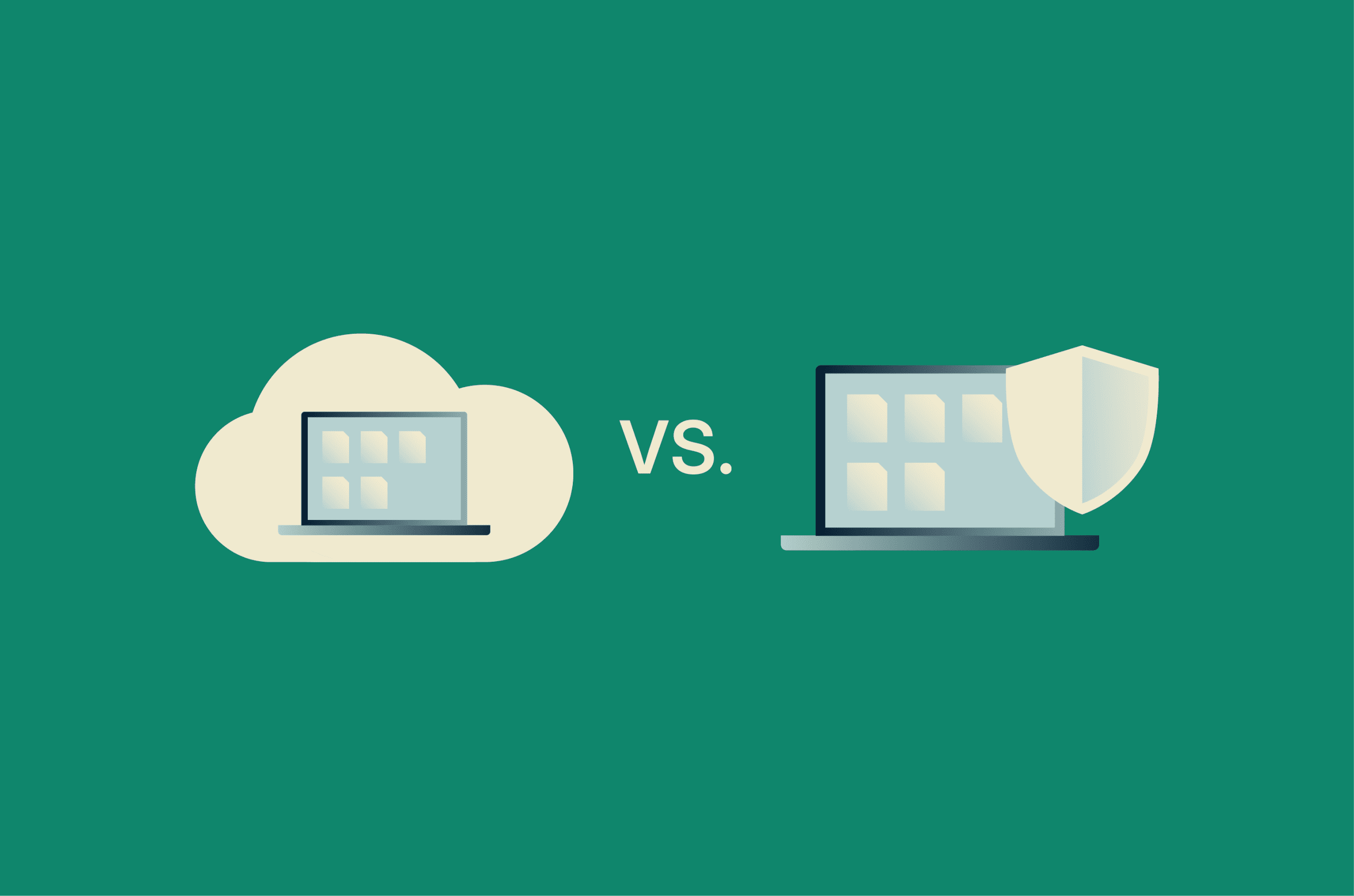
Virtual desktop infrastructure (VDI) and virtual private networks (VPNs) are often compared as remote access options, but they work in fundamentally different ways. VDI provides users with a desktop running on a remote server, while a VPN provides a secure connection to the company network from a user's device.
Note: This article focuses on remote access VPNs used by businesses to connect employees to internal systems. This differs from consumer VPN services, such as ExpressVPN, and from site-to-site VPNs that connect networks to each other.
VDI vs. VPN at a glance
| VDI | Remote access VPN | |
| Main purpose | Provides a hosted desktop environment | Secure network access to remote users |
| Where files are stored | On company servers (data center or cloud environment), not typically on the user's device | On company servers, but files may be downloaded, synced, or cached on the user's device |
| Where processing happens | Remote server | User's device |
| Upfront cost | High | Low |
| IT overhead | High, centralized | Lower, distributed |
| Typical fit | Regulated work, bring your own device (BYOD), contractors | Managed employees on company devices |
What is VDI and how does it work?
VDI is a setup where central servers host desktops, and users access them from their own devices. Instead of running locally on a laptop or phone, the desktop runs in a data center or cloud environment. The user's device receives the rendered desktop display and sends inputs, such as keystrokes and mouse movements, back to it.
Two components make this possible. A hypervisor partitions a single physical server into multiple virtual machines (VMs), each running its own operating system. A connection broker routes users to their assigned desktop after authentication.
During a session, screen updates, keystrokes, and mouse movements travel between the device and the data center. Applications and files stay on the server unless policies allow downloads, clipboard transfer, printing, or local drive access. Some deployments use persistent desktops that keep a user's files and settings between sessions. Others use non-persistent desktops that reset to a clean state after logout, which is common for task-based roles like call center work.
What is a remote access VPN and how does it work?
A remote access VPN creates an encrypted tunnel between a device and a network over the public internet. For businesses, that network is the company's internal infrastructure. The VPN lets remote users access internal servers and applications as if they were on the office network. Access still depends on the organization's network rules and user permissions.
A VPN client on the user's device authenticates with a VPN gateway (the server that receives VPN connections) on the corporate network. Common remote access VPNs use protocols such as Internet Protocol Security (IPsec) or Transport Layer Security (TLS) to authenticate the connection and negotiate encryption.
From that point on, data moving between the device and the network is encrypted in transit, which helps protect it from being read if intercepted on an untrusted network, such as hotel Wi-Fi.
Applications still run on the user's device, and files can still be downloaded to it. The VPN provides secure access to the network, not a separate workspace.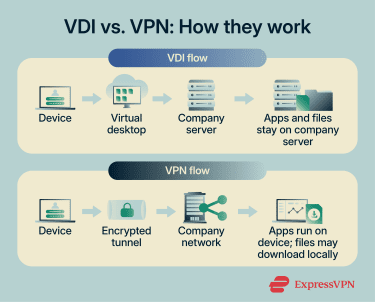
VDI vs. VPN: Key differences
Both technologies enable remote access, but they differ in security, performance, cost, and management.
Security and data handling
In VDI, files and applications stay on the server and aren't typically stored on the user's device. A lost or stolen laptop is less likely to expose company data. This can make data loss prevention (DLP) easier to enforce because controls are applied to the virtual desktop rather than to each user's device. Depending on the configuration, DLP policies can block actions like copying files to USB drives or downloading them to local storage.
A VPN encrypts traffic between the device and the network. Device security is handled through complementary controls such as endpoint protection, patching, device management, and access policies. In traditional VPN setups, once a user is authenticated, the device can reach the internal systems permitted by its access rules. If device controls are weak, an unpatched or infected laptop may still be able to interact with those systems. Depending on permissions and endpoint controls, users may also be able to download files, save them locally, or copy them to removable storage.
Organizations strengthen VPN access by combining it with additional controls. Multi-factor authentication (MFA) adds a second sign-in step, such as entering a code from an authenticator app. When enforced, device posture checks verify conditions such as disk encryption, operating system patch level, or endpoint protection before allowing access. Endpoint detection tools monitor devices for malware and suspicious activity once they're online.
User experience and performance
A VDI session looks the same across devices. A salesperson sees the same desktop on their office workstation, their home laptop, and their tablet at a client site. Because everything on screen is streamed in real time, performance depends on the network connection to the data center.
A basic office workload in a VDI environment might use anywhere from a few hundred kilobits per second (Kbps) per session, while richer workloads such as PowerPoint, video, multimedia, or 3D graphics can require several megabits per second (Mbps) or more. Actual bandwidth depends on the applications, display resolution, peripherals, and optimization settings. Slow or high-latency connections typically appear as laggy typing, delayed screen updates, or reduced visual responsiveness.
A VPN runs applications on the user's device, which does the work with its own processor, memory, and storage. Inside the tunnel, speed depends on internet bandwidth, distance to the VPN gateway, routing, and encryption overhead. Accessing files on an internal server is often slower than doing so from the office network. Apps feel fast and responsive because they run on the user's device, though performance still depends on any backend systems they rely on.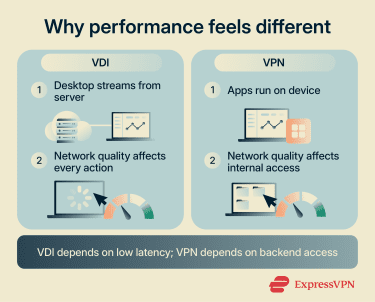
IT management and maintenance
In VDI, administrators maintain a small number of master desktop images. These are reference desktop configurations that users' virtual desktops are built from. Patches, software updates, and access policies are applied to these master images.
For non-persistent deployments, the change is applied to every user the next time they log in, and their desktop is rebuilt from the updated master. Persistent deployments often require more per-desktop management because each desktop keeps user-specific changes and settings. Either way, IT doesn't need to update each user's local device to patch the virtual desktop environment, though those devices still need operating system, browser, VDI client, and security updates.
The trade-off is that the server infrastructure must remain healthy. Users share the same underlying systems. Issues with components such as the connection broker, storage, or the authentication layer can disrupt access for many users at once.
A VPN requires less centralized infrastructure but more work on individual devices. Each user device runs its own operating system, which requires updates. Each VPN client must be kept up to date. Credentials and access policies have to be managed across a distributed set of devices.
Cost and infrastructure
VDI often carries high upfront and recurring infrastructure costs. Organizations pay for server hardware or cloud instances, storage, software licenses, network bandwidth capacity, and the staff to run it all. Costs scale with user count, and infrastructure usually needs to be sized for peak login and usage times.
A business VPN is cheaper to start. A gateway is less expensive than a virtualized desktop farm, clients are often low-cost or included, and the infrastructure can often run on existing servers or firewalls. Ongoing costs are primarily for gateway licensing or subscriptions, bandwidth, authentication services such as identity systems for sign-in, monitoring and logging, support, and endpoint protection.
Scalability and flexibility
VDI is easiest to plan when usage is predictable. Adding 200 call center agents to the same master image can be straightforward once the image, licensing, identity setup, and server capacity are in place. Scaling becomes more complex when usage is bursty or uneven, because each additional session consumes CPU, memory, storage, and sometimes graphics resources.
A VPN is generally simpler to scale for additional users. Adding a user usually means granting access through the organization's identity system and providing a client profile. Growth is limited by gateway throughput, concurrent connection limits, licensing, identity and MFA capacity, logging, endpoint support, and network design. Capacity can be increased by adding or upgrading gateways, using high-availability designs, or adopting a cloud-hosted service that scales automatically.
Application compatibility
Most standard business software works in both setups. VDI can be more complex for applications that rely on direct access to device hardware. This includes software that needs GPU acceleration (for graphics or 3D work), specific USB devices, or high-quality audio and video. Some VDI setups support GPU acceleration, USB redirection, and media optimization, but performance and compatibility depend on the platform, configuration, network quality, and endpoint device. These applications may run slowly, lose functionality, or fail to work well on a virtual desktop.
A VPN avoids many of these hardware access limitations because applications run on the user's device, with direct access to its processor, graphics hardware, and connected peripherals. This can make it better suited for hardware-intensive or specialized software, especially when the application can run locally and doesn't rely heavily on low-latency access to internal systems.
Also read: RDP vs. VPN: The complete guide to remote access, security, and speed.
VDI benefits and limitations
VDI runs desktops on company servers, so its strengths and trade-offs come from central control and shared infrastructure.
Benefits
- More centralized control: Because work is performed on a server-hosted desktop, security policies can be managed more consistently within the VDI environment. However, endpoint devices still need basic security updates and controls.
- Easier compliance checks: Auditors can review a single managed desktop environment rather than checking many individual devices, which can simplify evidence collection.
- Cleaner offboarding: Removing access can disable the user's virtual desktop without requiring a wipe or recovery of a physical device, though identity access and active sessions still need to be revoked.
Limitations
- Harder to change later: VDI requires investment in servers or cloud capacity, licenses, and operational setup, which can be difficult to replace or unwind.
- Shared failure impact: If the server infrastructure experiences an issue, it can affect many users simultaneously.
- Work stops during outages: If VDI is unavailable, users can't access their desktop at all, not just internal systems.
VPN benefits and limitations
A VPN runs applications on the user's device, so its strengths and trade-offs depend on each device and the network connection.
Benefits
- Familiar setup: Users work on their usual devices and applications, so training needs are often lower, though IT still needs to support VPN clients, device health, and access issues.
- Work can continue during issues: If the VPN connection is slow or unavailable, users can often keep working in local or cloud apps until access is restored, though internal systems may be unavailable.
- Flexible architecture: VPNs can be combined with other access models, such as zero-trust network access, which uses identity, device, and policy checks to limit access to specific resources. This can often be done without replacing existing systems.
Limitations
- Device management matters: Overall security depends on both centralized VPN controls and the maintenance of each user's device.
- More effort for audits: Compliance checks often require collecting evidence from multiple devices rather than a single environment.
- Harder to fully remove access: Disabling access stops new connections, but files already saved on a device may still remain.
VDI vs. VPN for common business use cases
The choice depends on who's connecting, what devices they use, and how sensitive the data is.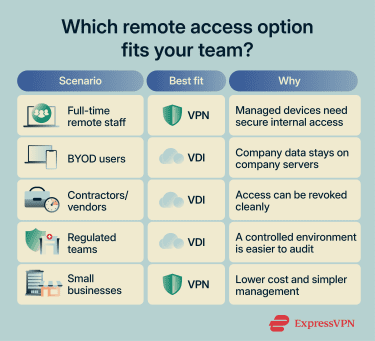
Remote employees
For full-time remote staff using company-issued laptops, a VPN is usually the simpler choice. These devices are typically managed by IT, with security controls such as disk encryption and endpoint protection already in place. In this setup, employees primarily need secure access to internal systems.
VDI is a better fit when policies or contracts require company data to remain off laptops, even temporarily, provided that local downloads, clipboard transfers, printing, and drive redirection are restricted.
Bring your own device (BYOD) teams
BYOD is often the clearest case for VDI. When employees or contractors use personal laptops and phones, IT usually has less control over these devices than it does over company-owned equipment.
With VDI, those controls are applied to the server-hosted desktop instead of the personal device. Users work on that remote desktop, so policies can be enforced without relying on the device's security. A VPN on a personal device can require stricter controls because the device may have direct access to internal systems unless segmentation, device checks, and least-privilege rules are enforced.
Third-party and contractor access
Short-term contractors, vendors, and partners often need limited access for a defined period. VDI works well here because access can be revoked cleanly by disabling the virtual desktop, without relying on the contractor's device state. A VPN can also be used, but contractor access usually needs strict controls such as network segmentation, least-privilege permissions, MFA, logging, time-bound accounts, and device posture checks so contractors can access only the systems they need.
High-compliance industries
Healthcare, finance, legal, and government organizations often have strict rules about where regulated data can be stored and how it can be accessed. For example, the EU's General Data Protection Regulation (GDPR), Article 32, requires organizations that handle personal data to implement appropriate technical and organizational measures. These measures are intended to ensure the confidentiality, integrity, availability, and resilience of processing systems.
VDI supports this by enabling users to work in a single, controlled environment that can be monitored and audited more consistently than many separate laptops. A VPN can also support compliance requirements, but it usually needs to be combined with strong device controls, MFA, least-privilege access, monitoring, and detailed logging.
Small and mid-sized businesses
For organizations without a dedicated IT team or strict compliance requirements, VDI is often more infrastructure than the workload justifies. A business VPN paired with MFA and endpoint protection is often a practical starting point for secure remote access. This changes if the business begins handling regulated data or relies heavily on contractors or personal devices.
Also read: Cybersecurity tips for small businesses.
VDI vs. VPN: Which option should you choose?
Choose VDI when regulated data needs to stay in a controlled hosted environment or when many users rely on personal devices. Choose a business VPN when users are on managed company devices and primarily need secure access to internal systems. VDI typically requires more infrastructure and operational support, while VPNs are often simpler to deploy and manage when supported by MFA, device security checks, least-privilege access, logging, and endpoint protection.
Many organizations use both. A VPN can support general staff on managed devices, while VDI can support contractors, BYOD users, and teams working with sensitive data. In that pattern, the two technologies complement each other rather than compete.
FAQ
Is VDI more secure than a VPN?
A VPN secures the connection to the network, while device security is handled through controls such as multi-factor authentication (MFA), least-privilege access, and endpoint protection.
Does virtual desktop infrastructure (VDI) require more bandwidth than a VPN?
Can a VPN protect data on personal devices?
Why do some companies choose VDI over a VPN?
Is a VPN enough for a small business with remote staff?
Can VDI and VPN be used together?